40% off everything — use code SAVE40 at checkout · ends in …
Skip to content
phpguru.store

For BCA · MCA · B.Tech · BSc IT · Diploma students

PHP Projects for College Students with Source Code, Report and Viva Questions

Final-year and mini projects in PHP and MySQL that actually run on PHP 8 and XAMPP — complete source code, the database file, a project report template written from the real database, and viva questions with model answers. One price, instant download.

What is in a college project pack

Free downloads give you a zip and nothing else. Each pack below is the source code plus the documents you are actually graded on.

Complete source code + database

Every PHP file and the matching .sql file. Tested on PHP 8 and MySQL/MariaDB — no mysql_connect() fatals.

Project report template (.docx)

Abstract, introduction, SRS, feasibility, users and modules, DFD and ER tables, use cases, the design of every database table, implementation, test cases, screenshot list, conclusion, references.

Viva questions with answers (.docx)

29 questions: project-specific ones about the database and workflow, plus PHP, MySQL and security fundamentals examiners always ask.

XAMPP installation steps

Step by step for Windows and macOS: htdocs, phpMyAdmin import, config file, first login, first test transaction.

Workflow walkthrough

How the main flow is implemented — booking, admission-to-result, purchase-to-sale — table by table, so you can explain it in the viva.

Email support + licence

Stuck on install? Email us the error. The licence lets you modify the code and use it in your project; the README explains how to declare it.

The 4 projects with a report pack in the download

Open the ZIP and the college-project-pack folder is there next to the source code. Same price as the product — the pack is included.

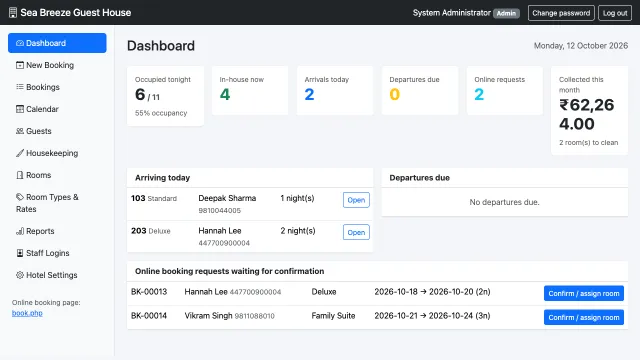
Hotel Management System — screenshot

Hotel / room booking website project

Hotel Management System

Front desk, bookings, invoices and a public booking page for one hotel

Database
36 tables
Modules
9
Viva questions
29
Test cases
14

PHP 8 · MySQL · custom admin panel

₹3,999$69 See project →
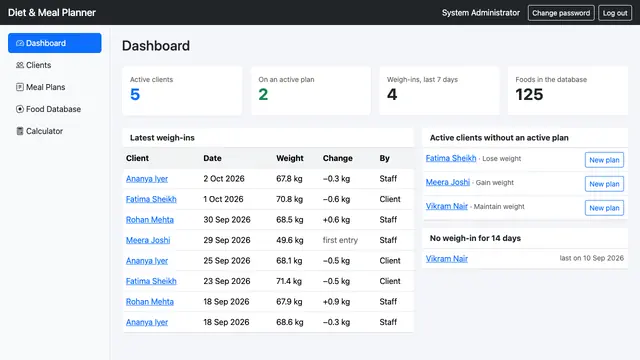
Diet & Meal Planner — screenshot

Diet planner / nutrition management project

Diet & Meal Planner

Client profiles, meal plans with calorie and macro totals, and a weight tracker, in PHP

Database
8 tables
Modules
8
Viva questions
29
Test cases
16

PHP 8 · MySQL · plain PHP, no framework

₹499$14 See project →
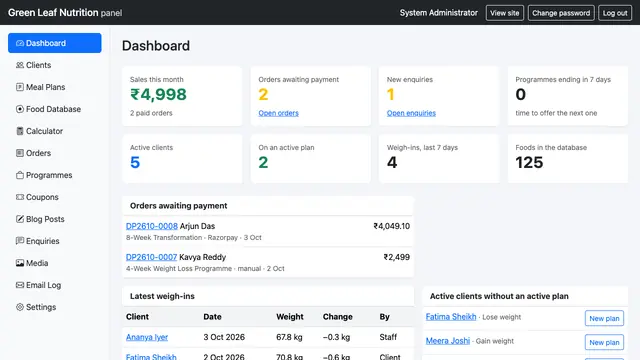
Diet & Meal Planner Pro — screenshot

Online nutrition practice: website, payments, client accounts

Diet & Meal Planner Pro

A dietitian's website with programmes for sale, Razorpay checkout, client accounts and the full meal planner, in PHP

Database
15 tables
Modules
7
Viva questions
29
Test cases
18

PHP 8 · MySQL · Razorpay · plain PHP, no framework

₹3,999$69 See project →
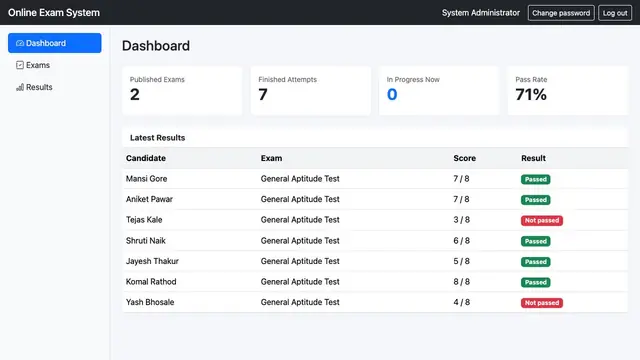
Online Exam / MCQ Test System — screenshot

Online examination / MCQ test project (mini project size)

Online Exam / MCQ Test System

Timed multiple-choice exams with auto-grading and results, in PHP

Database
7 tables
Modules
6
Viva questions
29
Test cases
10

PHP 7.4+ (tested 8.5) · MySQL 5.7+ (tested 8.0) · plain PHP + Bootstrap 5

Mini project / BCA project (about 760 lines of PHP, 7 tables)

₹999$29 See project →

How it works, from download to submission

  1. Buy and download

    Pay by card, UPI or PayPal through Razorpay. The ZIP link is on screen and in your email straight away.

  2. Install on XAMPP

    Follow the installation chapter: copy to htdocs, import the .sql in phpMyAdmin, edit the config, log in.

  3. Run every module

    Add test data, click through each screen, and watch the tables change in phpMyAdmin. This is what makes the viva easy.

  4. Make it yours

    Add a field, a report or a module. Update the report's design and test chapters with your change.

  5. Finish the report

    Fill in your details, paste your screenshots, draw the DFD/ER from the tables, read the viva questions.

Please read: how to use this without getting into trouble

  • Colleges expect your own work. Use the code as a base, change or add something real, and write the report in your own words. Chapter 5.6 of the report template already declares the licensed base — keep that paragraph.
  • Understand before you submit. The viva questions are written so you can explain the tables and the workflow. If you cannot explain a screen, do not include it.
  • Check your university's plagiarism policy. Some require a declaration of outside code; some limit how much may be reused. The README in the pack tells you what to declare.
  • Pick a size you can finish. A 7-table exam system or an 8-table diet planner you fully understand beats a huge system you can only demo. Ask us by email if you are unsure which fits your course.

More PHP projects for mini projects and semester work

Smaller systems with source code and the database — good for a mini project or as the base for your own title. These do not yet include the report pack; the PHP for School Projects course walks through a report outline and viva for a library system.

Education & Schools

Finance & Billing

HR & Payroll

Healthcare & Clinics

Hospitality, Bookings & Fitness

Operations & Tracking

Sales, CRM & Support

Web, Content & Tools

Questions students ask

Can I use purchased source code for my college project?

Yes, as a base you build on and declare. The licence allows you to install, modify and use the code. Your college will expect the submitted work to be your own, so the pack asks you to change or add something, write the report in your own words and state in the report that the base code was licensed from phpguru.store. Check your university's plagiarism policy before you submit.

Is the project report ready to submit?

It is a complete template with the abstract, SRS, design tables (users, modules, DFD and ER lists, use cases), the real database design of every table, installation steps, a walkthrough of the main workflow, test cases and a screenshot list. You add your name, college and guide, your own screenshots, the diagrams drawn from the tables, and the changes you made. Submitting it unchanged is not what it is for.

Will it run on XAMPP and on my laptop?

Yes. Every project runs on XAMPP (Windows, macOS or Linux) with PHP 8 and MySQL/MariaDB. The report's installation chapter has the exact steps: copy the folder to htdocs, create a database, import the .sql file, edit the config file, open the URL.

Which PHP version and framework are used?

Plain PHP with MySQL — no framework to install, so every page can be read and explained in a viva. Each project's README states its requirements (PHP 7.4+, tested on PHP 8.5; MySQL 5.7+, tested on MySQL 8.0) and each ships its .sql file.

Do you have a project for my specific title?

The packs currently cover the online examination system and diet planning. The other products on this page cover library, exam, fee, hostel, attendance, billing, CRM and more — they come with source code and the database but not yet with the report pack. Email us if your title is close to one of these and you are not sure.

What if I cannot install it?

Email support is included: send the error message or a screenshot and we will tell you what to change. Most problems are a wrong database name in the config file or a missing import.

Can I see it before I buy?

Each product page has screenshots and a full feature list, and this page lists exactly what is in the pack. Digital downloads are not refundable once delivered, so read the product page and ask us any question by email first.
Guides: BCA final year project ideas · 20 PHP project ideas · Why buy instead of a free download · Licence

Not sure which project fits your course?

Email your course, semester and project title and we will tell you honestly which one fits — or whether none does.

Email us →